
If you run OTOBO as your helpdesk, backups aren't optional — you're sitting on ticket history, customer data, attachments, and configuration that would take weeks to reconstruct if a server died tomorrow. The good news is that OTOBO ships with a backup mechanism out of the box. The bad news is that "ships with a backup mechanism" and "has a backup solution" are two very different things, and the gap between them is exactly where most OTOBO admins get caught out.
scripts/backup.pl
This post covers both: how the native scripts/backup.pl approach actually works, and why — once you look past the first successful backup — it falls apart as something you can actually rely on long-term.
OTOBO's own backup tooling lives at scripts/backup.pl, run from the command line on the server itself:
perl scripts/backup.pl -d /path/to/backup/directoryRun it, and it will:
Kernel/Config.pmThat's genuinely useful — it's the same core logic that any proper OTOBO backup needs to build on. If you've never taken a backup of your OTOBO instance before, running this once, today, is better than not having one at all.
scripts/restore.pl takes a backup produced by the script above and puts it back — database, config, and article storage. Also fine, also command-line only, also entirely manual.
Here's the problem: backup.pl is a script, not a backup strategy. It does the one job it does — produce a dump and an archive — and stops. Everything else that makes a backup actually protect you is left as an exercise for the admin:
No scheduling of its own. The script doesn't run itself. You need to hand-roll a cron job, keep it working across server migrations, and remember it exists.
No off-site copy. By default, your "backup" sits on the same disk, the same server, sometimes the same Docker container, as the OTOBO instance it's backing up. If that disk fails, or that server is compromised, your backup goes down with it. Getting a copy to a NAS, FTP server, OneDrive, or Dropbox means writing and maintaining your own shell script on top — usually something gluing together rclone or rsync, cron, and a fair amount of trial and error around credentials, retry logic, and what happens when the transfer fails silently at 2am.
No retention policy. Nothing prunes old backups for you. Either you write more scripting to delete anything older than N days, or your backup directory grows forever until it fills the disk — which, ironically, is a great way to bring down the very system you're trying to protect.
No visibility. There's no dashboard, no list of what backups exist and where, no easy way to check "did last night's backup actually work?" without SSHing in and checking logs or timestamps by hand. If a cron job silently stops running — a changed cron path, a permissions issue after a server update, a full disk — you often don't find out until the day you actually need to restore.
No one-click restore. Restoring means shell access, finding the right archive, and running restore.pl correctly against it. Under pressure, during an actual incident, that's exactly when you don't want extra room for a typo.
No encryption. Your backups — full of customer data, ticket content, anything an agent has ever typed into the system — sit as plain, readable files wherever they land. If a laptop with SSH access is compromised, or a cloud storage account gets breached, there's nothing protecting the data itself.
No safety net on restore. Nothing warns you, in an obvious way, that running restore.pl is about to overwrite your live database and configuration. It just does it.
None of this makes scripts/backup.pl a bad tool for what it is — a low-level building block. What it makes it is a poor foundation to leave your entire disaster-recovery plan resting on, especially once your OTOBO instance is doing anything customers or your business actually depend on.
This is exactly the gap Backup Tools for OTOBO was built to close — not by reinventing OTOBO's backup logic, but by wrapping the parts that are already solid (backup.pl/restore.pl, and OTOBO's own built-in scheduler) in everything that's missing around them.
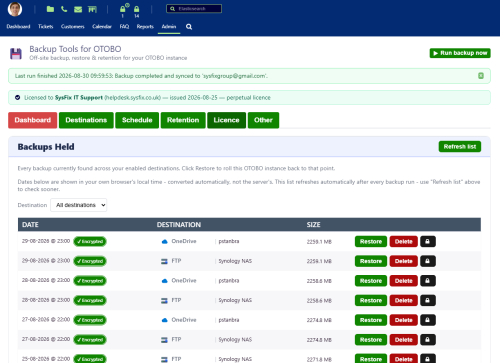
Backup Tools adds an Admin → Backup Tools area directly inside OTOBO. Every setting — destinations, schedule, retention, restore — is a few clicks, not a shell session.
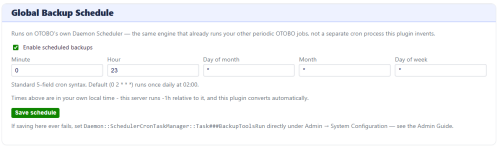
No separate cron job to babysit. Backups run on OTOBO's own Daemon Scheduler — the same background process already responsible for ticket escalations and other periodic tasks — so there's nothing extra to install or maintain, and nothing that silently breaks when your server config changes.
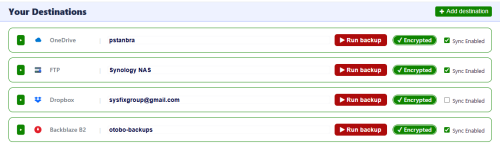
Local disk, a network share, FTP, SFTP, OneDrive, and Dropbox — configure as many as you want, and every scheduled backup copies to all of them. No hand-written transfer scripts, no credential-juggling — connecting a cloud destination is a one-click sign-in popup; FTP/SFTP is a form..
Local disk, a network share, FTP, SFTP, OneDrive, and Dropbox — configure as many as you want, and every scheduled backup copies to all of them. No hand-written transfer scripts, no credential-juggling — connecting a cloud destination is a one-click sign-in popup; FTP/SFTP is a form
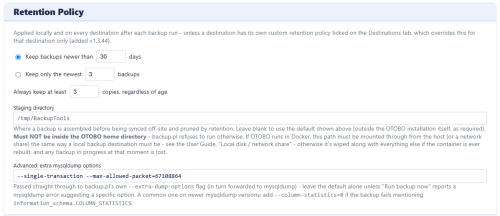
Keep backups newer than N days, or keep only the newest N — set once, applied automatically after every run, with a guaranteed minimum number of local copies so a misconfigured window can never leave you with zero backups. Need one destination to keep more or less history than the others? Each destination can override the policy independently.
Found a backup you specifically don't want retention to ever touch — right before a big config change, say? Lock it with one click. It's excluded from pruning until you unlock it, no matter what your retention policy says.

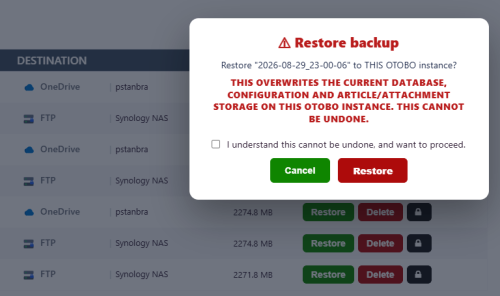
Restoring is one click plus an explicit "I understand this cannot be undone" confirmation — not a silent overwrite. If the backup is encrypted, it asks for the key at exactly the right moment.
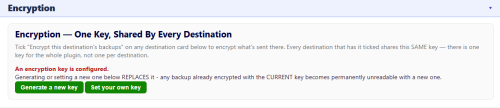
Turn on AES-256 encryption per destination, with a key you generate and control. Leave trusted local storage unencrypted while encrypting everything that leaves the building, or the reverse — your call.
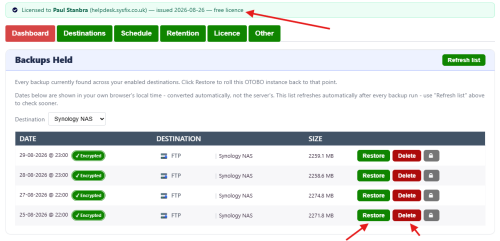
Even on the free tier, or with an expired key, local disk and FTP backups keep running, and every backup you already have — on any destination, any tier — can still be listed and restored. Recovering your own data is never held hostage to a renewal.

scripts/backup.pl is a fine dump tool. It is not a backup solution, and treating it like one is how OTOBO admins end up discovering, at the worst possible moment, that their "backup" was sitting on the same disk that just failed, or hadn't actually run in three months because a cron job quietly broke.
If you're already relying on the native script and duct-taping cron, rclone, and hope around it, it's worth seeing what a purpose-built alternative looks like: www.sysfix.co.uk/otobo-backup-tools.
When you subscribe to the blog, we will send you an e-mail when there are new updates on the site so you wouldn't miss them.
© SysFix IT Support Ltd, 2003-2026
VAT Number: GB 206 7821 12
Company Number: 09416191